BLACK FRIDAYMASSIVE SAVINGS+ NEW OFFERS
UP
TO
78%OFF
EVERYTHING
ENDS SOONSALE ENDS NOV 29 · 11:59 PM PST
00DAYS
00HRS
00MIN
00SEC
SHOP NOW ➜

The Ultimate Workbook Pack Is Finally Here — My Biggest Workbook Collection Ever!

550+ Excel Templates, Applications & VBA Trainings — Now with the NEW Workbook Library App.

The Ultimate Workbook Pack Is Finally Here — My Biggest Workbook Collection Ever!

The Excel Productivity Suite ribbon tab inside Microsoft Excel

New Product8 Tools · 1 Ribbon Tab

The Excel Productivity Suite is here.

Get This Add-In Now

How to Excel VBA: The Ultimate Cell Formatting Masterclass + Free Cheat Sheet

Bronze, Silver, Gold and Platinum Elite Membership badges
Like this free workbook?

Get the updated member versions of the trainings & workbooks.

Elite members get the improved versions of what Randy shares for free on YouTube, plus everything below:

  • 230+ updated trainings & workbooks
  • 30 business tools & counting
  • GPT workbooks & VBA codebooks
  • Full training archive + videos
  • Platinum coaching with Randy
  • Early access & member discounts
See Elite Plans →Plans from $5/month · Instant access · Cancel anytime

Manually formatting reports in Excel is a time-consuming process—adjusting fonts, colors, borders, and alignment over and over again. If you find yourself repeating the same formatting tasks every time you generate a report, it’s time to automate the process with VBA. Formatting should be fast, consistent, and effortless, not something that eats up your productivity.

In this training, I’ll walk you through step-by-step VBA coding to format any report efficiently, covering fonts, colors, borders, number formats, and more. You’ll get a cheat sheet for quick reference, a sample report to practice on, and everything you need to confidently format cells with VBA. Whether you’re generating reports for clients or streamlining your own workflow, this session will help you save time and create polished, professional reports with ease.

Watch the training now and take control of formatting in Excel VBA!

RELATED TRAININGS

Looking for more resources?

Use the search bar below or explore the Related Trainings above for more content tailored to your interests!

Expand Your Knowledge

Pro Version: 5 Upgrades That Save Landlords Hours

Every unit, every lease and every late payment in one Excel app, for long lets and holiday lets. The Pro version adds rent reminders by WhatsApp or e-mail, lease renewal offers in one click, a double-booking guard with iCal files, every owner statement in one click and a tax-year report for your accountant.

One Excel app for the whole shop: point of sale, stock, payroll and P&L, in two currencies. The Pro version adds live exchange rates, cash drawer close, staff logins with PINs, WhatsApp receipts, a report pack and supplier price alerts.​

Pro Version: 5 Upgrades for a Growing Shop​

Run your whole factory from one Excel workbook: production, orders, stock, buying and planning. The Pro version adds lot tracking with one-click recall, barcode job travelers with real job costing, smart purchasing rules and a full audit trail.​

Excel AI Toolpack Add-In

Combines 12 incredible AI tools into one seamless package. Revolutionize your productivity by effortlessly fixing formula errors, extracting data, analyzing dashboards in a single click, and receiving instant AI responses. No API required—just the untapped potential of AI enhancing Excel.

Consists of 1000 resources, ensuring it's the only Excel reference you'll ever need. The guide is organized into 10 tabs, each containing 100 resources that are easily sortable and filterable, making it effortless to find the tools you're looking for.

ULTIMATE FREELANCERS
RESOURCE GUIDE

Packed with essential tools and templates, this comprehensive guide is your one-stop-shop for all things freelancing. With 1,000 live links and a single click-to-update feature, you'll always have access to the latest freelancing resources.

The Ultimate CRM Application gives you a powerful, organized system inside Excel to track leads, manage follow-ups, monitor your pipeline, and stay on top of every opportunity — all in one place. No more scattered notes or missed deals. You’ll save hours each week, gain total clarity over your sales process, and operate with the confidence of a true professional while moving prospects smoothly from first contact to closed deal.

Picture of Randy Austin

Randy Austin

Randy Austin is a 7x MVP and a Global Excel Awards Winner, with 30 years of experience in Excel solutions. His YouTube videos have garnered over 40+ million views, with over 500 trainings and templates, empowering users with practical Excel development techniques and templates.

2024 Global Excel Awards winner
Excel For Freelancers YouTube channel: 50.9 million views
Excel For Freelancers YouTube channel: 1 million subscribers

STOP BUILDING FROM SCRATCH. GET 550+ EXCEL WORKBOOKS.

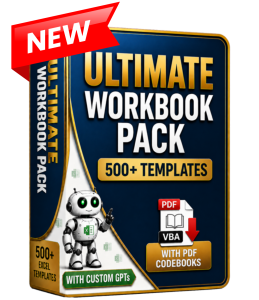
Get 550+ done-for-you Excel templates, plus 117+ VBA trainings, all organized in one searchable library. Every workbook includes tutorials, PDF codebooks, and built-in custom GPT support—so you can find, customize, and start using proven Excel solutions without rebuilding from scratch.

Skip the blank chat. Grab a proven AI skill.

1,000+ AI skills ready to use for Excel, marketing, writing and business tasks. Each one gives Claude or ChatGPT clear steps to follow, so you stop rewriting prompts and fixing weak answers. Choose a skill, load it into your AI tool in about two minutes, and get a useful result without the trial and error.

STOP LOSING WORK IN EXCEL. GET 8 TOOLS IN ONE RIBBON TAB.

Auto-save with real version history, team sync, per-person access control, a pop-up date and time picker, import manager, link finder and file manager. The Excel Productivity Suite installs into Excel itself, so every tool is right there in every workbook you open.

New Product

1,000 verified AI resources — all in one Excel-based guide. Explore tools, courses, experts, and communities across 10 categories, all curated and organized so you can skip the noise and focus on what actually helps you grow. Sort, filter, and learn faster with a built-in Expert GPT assistant — your shortcut to mastering AI without wasting time searching.

New Product

STOP LOSING WORK IN EXCEL. GET 8 TOOLS IN ONE RIBBON TAB.

Auto-save with real version history, team sync, per-person access control, a pop-up date and time picker, import manager, link finder and file manager. The Excel Productivity Suite installs into Excel itself, so every tool is right there in every workbook you open.

Get 550+ done-for-you Excel templates, plus 117+ VBA trainings, all organized in one searchable library. Every workbook includes tutorials, PDF codebooks, and built-in custom GPT support—so you can find, customize, and start using proven Excel solutions without rebuilding from scratch.

Turn Your Excel Vision into Reality!

Need a custom Excel VBA solution? My expert developers build powerful automation—dashboards, data processing, reporting, and more. Save time and boost efficiency with a tailored solution!

DOWNLOAD YOUR FREE WORKBOOK

Kindly avoid using Hotmail, outlook.com, or live.com email addresses, as they may incorrectly mark our emails as spam, resulting in delivery issues for your workbook.

It's Great to see you!

Login or Create an Account if you still don't have one...
Secure member login
Get started badge